Everything from proposal to delivery in one workflow
Client Octopus connects lead capture, booking, proposals, invoices, payments, projects, client communication, and delivery into one seamless system inside WordPress.
Lead Capture
Turn website visitors into leads, automatically
Embed the [clientoctopus_lead_form] shortcode on any page and every inquiry lands directly in Client Octopus, instead of a separate form plugin you have to check on its own. Choose which fields to show and require, customise their labels, and add a consent line — available on every plan, including Free.
Every submission appears in a dedicated Leads screen where you can track status, mark a lead as contacted, archive it, or convert it straight into a client record with one click. Optional Cloudflare Turnstile CAPTCHA and configurable submission rate limits help keep automated spam out, and you can turn on an automatic reply to whoever submits the form — including a direct link to book a call, if Call Booking is enabled.
Proposals
Create proposals that look professional and close faster
Build polished client proposals in minutes with a guided workflow, reusable templates, automated pricing calculations, and AI-assisted writing. Send proposals through a branded client experience where clients can review, request changes, accept, and pay, all from a secure link without needing an account.
Client Octopus handles the entire proposal lifecycle for you, from draft to payment, with built-in tracking, automated notifications, Stripe or PayPal integration, and seamless project creation when work is approved.
Pricing isn't limited to a single flat total either. Switch a proposal to Package Selector pricing to offer unlimited tiers — each with its own line items — plus optional add-ons, and let the client pick what fits as the total recalculates live. Or set a proposal to Recurring billing instead of a one-off payment, and the moment it's accepted, Client Octopus automatically creates a Recurring Invoice profile to handle billing from there on.
Build proposals in minutes
Client Octopus includes a guided 5-step proposal builder with customisable templates, AI-assisted writing, and drag-and-drop content sections to help you create polished proposals quickly. It also supports dynamic pricing with VAT, discounts, deposits, and multi-currency handling to keep every proposal accurate and client-ready.

Give clients a smoother approval experience
Client Octopus lets you securely share proposals via email with one click, where clients can accept, decline, or request revisions, with Stripe or PayPal payments available on acceptance. It also provides real-time proposal status tracking, email notifications, and fully mobile-friendly proposal pages for a smooth client experience across devices.

Payments
Get paid faster without leaving WordPress
Turn accepted proposals into real payments instantly with built-in Stripe or PayPal integration, automated deposit handling, and seamless client checkout flows. Client Octopus keeps proposals, invoices, payment requests, and project balances connected in one system, so you always know what's been paid, what's outstanding, and what happens next.
From deposits to final balances, the payment experience is designed to feel simple for clients and effortless for you.
A smoother payment experience for you and your clients
Clients can review pricing, pay deposits or final balances, download receipts, and complete the entire approval process directly from their proposal or client portal, without confusing payment links or endless email follow-ups.
Automatic payment tracking, receipt generation, and email notifications keep every stage of the payment lifecycle organised for both sides. If a payment is declined, expires, is cancelled, or needs extra verification from the client's bank, both of you are notified automatically instead of being left wondering what happened.

Invoices
Send invoices without waiting on a proposal
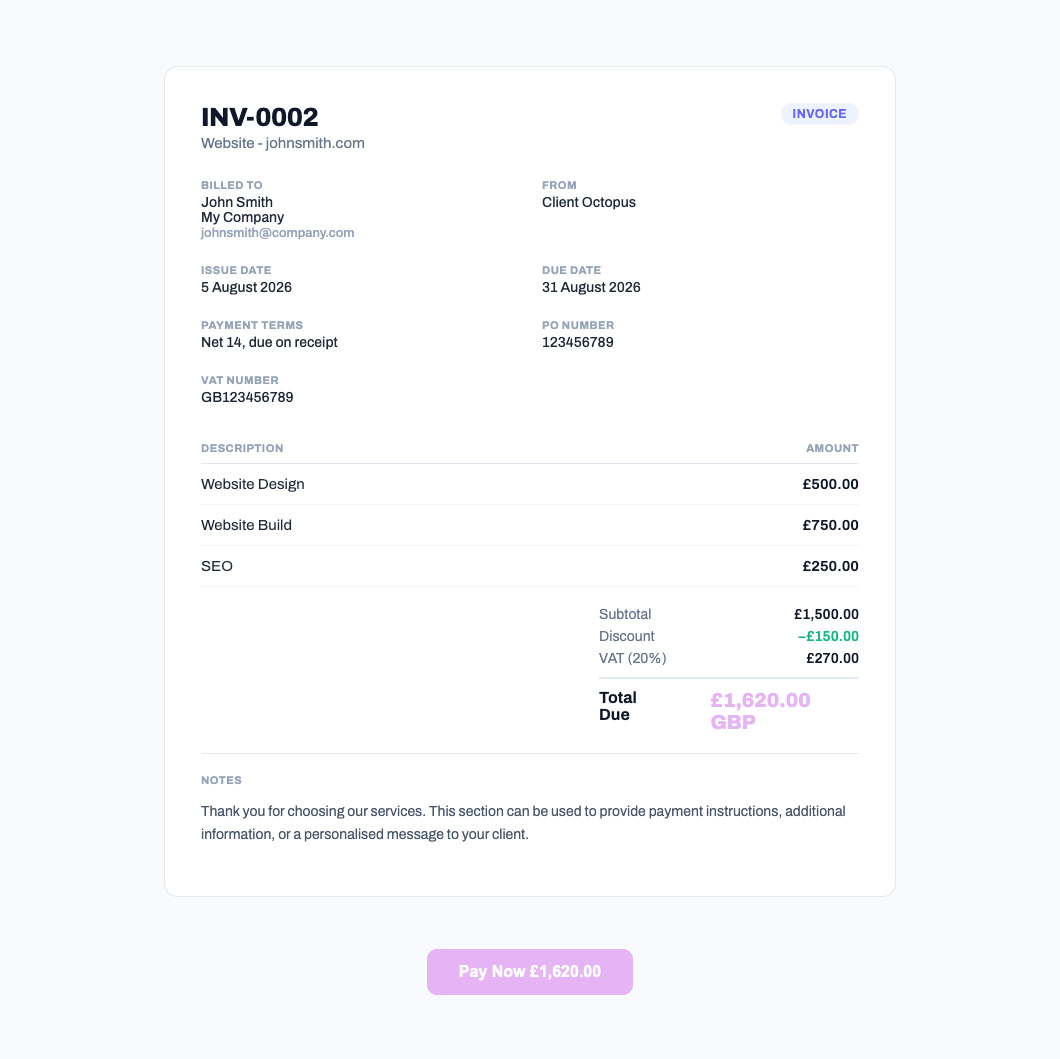
Standalone invoices are a separate workflow from proposals, available on every plan including Free. Assign a client, add line items with VAT and discounts, and send an auto-numbered invoice directly to their inbox, with no proposal required first.
Clients pay how it suits your plan: mark invoices as paid manually once a bank transfer lands, or let the "Pay Now" button — powered by Stripe or PayPal, whichever you've connected — collect payment automatically and update the invoice status for you.
Bill the same client on a schedule? Set up a recurring profile — weekly, monthly, quarterly, or yearly — and Client Octopus generates and sends a fresh invoice automatically every cycle, with each one still paid individually through the same Pay Now flow by default.
On Pro and Agency, opt a recurring profile into Auto-charge instead, and Client Octopus charges the client's saved Stripe or PayPal payment method automatically each cycle — no Pay Now link needed. The first invoice is always paid manually to securely save the payment method; if a later charge fails, the client is notified and it's retried automatically, with the profile pausing itself for you to follow up after repeated failures.
A dedicated invoice page your clients can pay from
Clients open their invoice at a secure link (no login required) and see a clean, itemised breakdown with VAT, discounts, and the due date. The page supports browser printing to a tidy A4 layout, so clients who need a paper or PDF copy for their own records are covered too.
On Pro and Agency, a "Pay Now" button creates a checkout session on demand with your active payment provider — Stripe or PayPal. Once the provider confirms payment, the invoice is automatically marked paid via webhook, with no manual reconciliation needed.
Call Booking
Let leads and clients book time with you directly
Add the [clientoctopus_booking_form] shortcode to any page and visitors can book a call based on your configured weekly availability, buffer time between calls, minimum notice, and how far in advance someone's allowed to book. Available on Pro and Agency.
Both you and the client get a confirmation email with a calendar invite (.ics attachment) and a one-click "Add to Google Calendar" link, followed by a reminder an hour before the call. Manage every booking — view, search, cancel — from a dedicated Bookings screen.
Connect Google Calendar, Microsoft 365/Outlook, or Apple iCloud to sync both ways: existing events on your calendar automatically block matching slots in your availability (shown with their real event title), and every confirmed booking is pushed out to every connected calendar as a real event, including your meeting link — no manually adding calls to your calendar ever again.
Projects
Keep every client project organised in one place
When a proposal is accepted, Client Octopus automatically creates a project workspace where you can manage progress, track activity, communicate with clients, and keep everything related to the job connected in one system.
Instead of juggling email threads, shared drives, and separate project tools, every project stays organised inside your WordPress dashboard, from kickoff to final delivery.
Turn approved work into structured projects automatically
Accepted proposals instantly become active projects with timelines, activity tracking, client messaging, file management, and status updates already connected. Your team and clients always know what's happening, what's been delivered, and what still needs attention.
Everything stays centralised, searchable, and tied to the original proposal and payment history, giving you a cleaner workflow and a more professional client experience.

Client Portal
Give clients a professional portal they'll actually use
Client Octopus includes a dedicated client portal where clients can view proposals, track project progress, upload files, review deliverables, download receipts, and stay connected throughout the entire project lifecycle.
Instead of relying on scattered email threads and shared folders, clients get one branded space to access everything related to their work, directly inside your WordPress site.
Everything your clients need in one secure place
Clients can log in to a clean, branded portal to review proposals, approve deliverables, send messages, access shared files, and manage payments without needing separate tools or accounts across multiple platforms.
The portal keeps communication, project activity, files, and approvals organised in one streamlined experience that feels modern, professional, and easy to use.

Notifications
Keep clients informed automatically at every stage
Client Octopus sends automated email notifications throughout the entire client lifecycle, from proposal delivery and payment confirmations to project updates, approval requests, and completed work notifications.
Every interaction stays clear, professional, and timely without requiring manual follow-ups or repetitive admin work.
Professional communication without the constant follow-ups
Clients automatically receive branded email notifications whenever proposals are viewed, payments are completed, files are shared, approvals are requested, or project statuses change, helping projects move forward without missed messages or confusion.
For you, that means fewer manual emails, fewer “just checking in” conversations, and a smoother experience for everyone involved.

Analytics
Understand how your business is performing at a glance
Client Octopus gives you a clear overview of your proposal pipeline, revenue, and conversion performance so you can understand how your business is growing over time. Track proposal acceptance rates, monitor revenue trends, measure average time-to-close, and see how efficiently proposals are turning into paid work.
Everything is centralised into one reporting dashboard designed specifically for freelancers and agencies managing client projects inside WordPress.
Track revenue, proposal performance, and business growth in real time
View revenue over time, proposal conversion rates, average close times, recent activity, and proposal performance through a clean analytics dashboard with filters for this week, month, or year.
Client Octopus also lets you export reporting data as CSV files, making it easy to share insights, analyse performance externally, or keep records for your business reporting workflows.

Webhooks & Automation
Connect Client Octopus to the tools you already use
Client Octopus includes webhook and automation support so every key action in your workflow can trigger external tools, internal systems, or third-party integrations. From proposal creation and acceptance to payments, project updates, and completion events, you can automate your entire client lifecycle without manual intervention.
Build workflows that connect Client Octopus to your existing stack and remove repetitive admin work from your day-to-day process.
Automate your client workflow end-to-end
Trigger real-time webhooks when proposals are sent, viewed, accepted, or declined, when payments are completed, or when projects are created and updated. Connect Client Octopus to tools like Zapier, CRMs, project management platforms, spreadsheets, and internal systems to automate your entire workflow.
With flexible event-based automation, Client Octopus becomes the central source of truth for your entire client workflow, powering everything from onboarding to delivery without manual updates.

Ready to streamline your client workflow?
Join freelancers and agencies using Client Octopus to manage proposals, payments, projects, and delivery from one connected platform.